Sunday, 15 September 2013

Pwnboxer and WoW 5.4 : Siege of Orgrimmar. Game windows not on correct monitors

Today I tried to get pwnboxer to run WoW 5.4, and run it did .... just not on the correct monitor(s) (all the game windows got piled up on top of one and other).

However a quick investigation turned up the cause of the issue. As of patch 5.4 WoW no-longer seems to respect the run in 32bit mode option Pwnboxer sends to it (something Pwnboxer currently needs it to do).

Rather it looks at your OS and goes 'oh this is a 64bit pc I'll use the 64bit client' even though it has been asked to run the 32bit client.

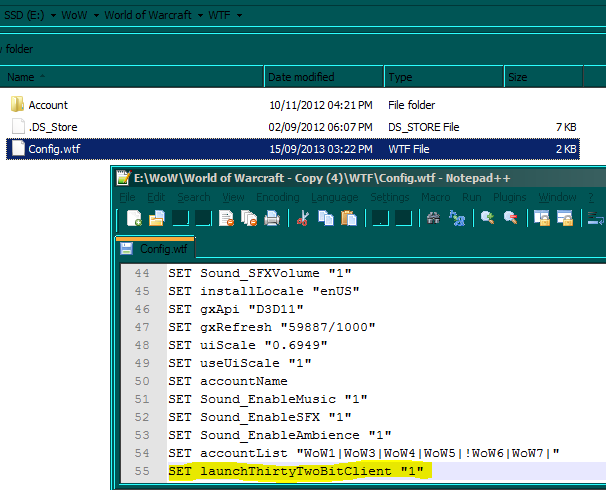
The fix to this however is quite simple first go to the 'WTF' directory under the wow directory and look for the 'Config.wtf' file, then add/amend the line below
SET launchThirtyTwoBitClient "1"


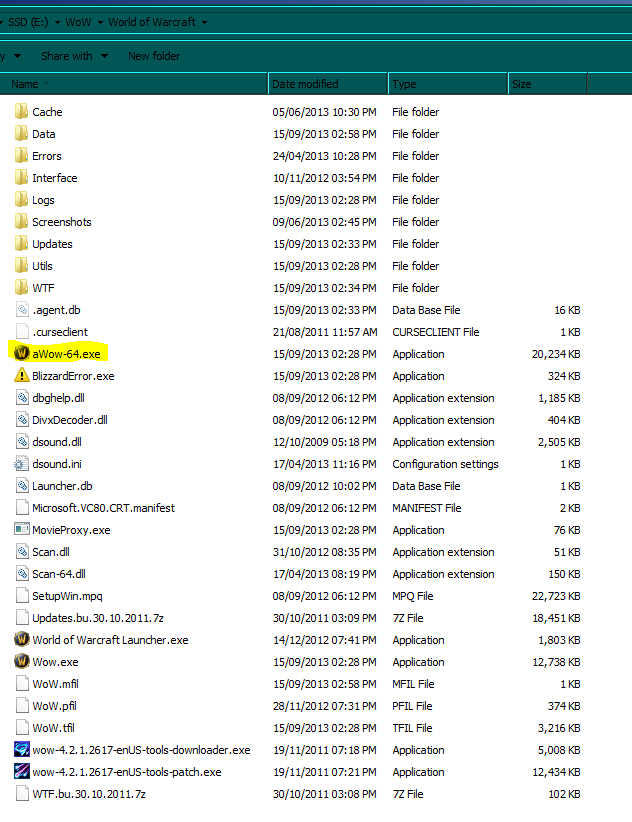
Then go to the main wow directory and rename the 64bit client from 'Wow-64.exe' to 'aWow-64.exe' that will stop the launcher trying to load it.


For more info, see the official forum post about the problem


Xsplit system sound not recording

Well this was an odd one. Today I tried to get Xsplit to record system sounds aka the sounds a game plays over the speakers etc. but it failed to do so. Mic input worked fine when tested so I had a deeper look into the issue.

It turns out that the latest patch for Xsplit did something odd to its response to being muted in the system sound panel. Rather than muting the app (xsplit) like it should, it muted the system sound input to Xsplit instead. So as a result you have to keep the app un-muted to make it work properly.


Sunday, 1 September 2013

Final Fantasy XIV: a realm reborn, pointers/advice

Recently I purchased Final Fantasy XIV and I have to say its a impressive game (just have a look at the graphics it has. see this Link)

However having played it for several hours I came to turn in a quest but it had a grayed out complete button, this had me thinking I had missed something in the quest and so I went back and followed the quest through thoroughly end to end and found .... nothing, I had not missed a thing apart from the fact that the quest turn in had ... options for a reward, but being that I have my system set at a high resolution and the text was small and a similar colour to the popup background, I missed the 'options' label entirely.

(see screen grab below so you don't miss it ;-P ,
note I have highlighted the sections so they are easy to spot )


also whatch out for things like dye or Materia vendors as these will be no good to get anything from until you have the correct crafting skills to use them unlocked (this differs from dyeing things in Rift or geming items in WoW so if you come from either of those games you will be easily caught out). 
Also on the point of differences, whilst you can buy things directly from the market boards in each main city you don't appear to be able post items directly to them (like you can in Rift or WoW) instead you have to use a 'retainer' these NPCs can be unlocked via the  'retainer representative' NPC but ..... only if you have enough rep with that city.

I hope that this post helps some of you out. 

Friday, 16 August 2013

Untangle 2nd LAN + VF SS = Fail

Looks like Untangle does not support IP-SEC connections over secondary interfaces (at lease in the free version, I don't know if it does for the payed support version) and as a result I could not get my Vodafone Sure Signal to work with it on the secondary connection (it worked on the main one but who wants a unknown black box appliance with a remote control VPN just sitting in with everything else).

In the end I worked around this problem by adding a pfsense firewall to the network and letting it handle the splitting of the networks / dhcp stuff then hanging the untangle instances off that (one for the main net, one for the guest net and none for the FV SS net (no point as its on its own and is picky about things)

Sunday, 11 August 2013

Untangel bridge mode + VMware ESXi

So recently I tryed to get untangle working in transparent bridge mode as a VM under ESXi but I could not get packets flowing from the lan to the wan sides, or even from the lan side to the untangle. However the untangle vm itself could see the internet ... strange hmm.

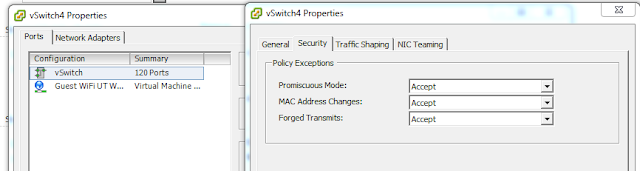
Well after much googleing I found the cause of the issue. It turns out that in bridge mode the untangle needs full network card functionality and hence you have to enable 'promiscuous mode' on the virtual switches associated with the LAN and WAN ends of the untangle vm. The ESXi Vswitches 'promiscuous mode' defaults to disabled.


The above shows where the setting is once you get to the virtual switch list (Configuration > Networking).

Hope this will be of help to someone ;-)

Monday, 5 August 2013

Yoga 13, Stop that Buzzing !!!

Over the past few months of owning a Lenovo Yoga 13, I have been plagued by a loud buzz from its fans every time I hold it on an angle or even vertically (in tablet mode).
Now having a bit of time to hand (and also having got thoroughly sick of the buzz) I have sorted it and the fix is surprisingly easy to do.

The first step is to take out the keyboard (this is easy to do and there are plenty youtube vids on this).

Step two is to relieve the left had fan casing a little bit, (if you shine a flashlight across the fan housing you will see a faint curved line following the curve of the fan hole on the left hand side of the left fan (looking at the unit with the memory module on the left).
To do this you need to bend the fan housing up about 1/2 to 1 millimeter, around the left side of the left fan, following the faint line you will see on the fan casing.


This problem seems to be a manufacturing defect, maybe the construction system that puts the laptops together presses just a little to hard when putting the fan bit (or some other part) in and thus bends the fan housing

All in all I am now quite pleased with the buzz-lessness of the unit ;-)

Note. If you do this for your unit and break something in the process, I can NOT be held accountable for your actions or the breakage, this worked for me but may not for you.

Thursday, 25 July 2013

multi dhcp range on Untangel / Vodafone Sure Signal


So this evening on my way home from work I purchased a 'Vodafone Sure Signal' unit to sort out the phone signal coverage problem I have for Vodafone.

Upon reading through the manual it turns out that the Sure Signal configures itself from what Vodafone tell it when it connects to them over the web and then all management of the device is done via the Vodafone website, no mention is made to any local management portal for the device (I'll have a look and see if there is one some other time).

Having seen this, I though it best to put it on its own network segment away from everything else (network monkey anyone ?? (hak 5 reference )), probably over cautious of me but better safe than sorry hmm + it gives me chance to practice setting up things for when I add a guest WiFi lan later.

That decided I looked for how to set up the extra dhcp ranges and firewall rules, that lead me to this page on the Untangle site. That nearly completely sorted things for me but I found out that just doing that is not enough.

First, the 'dhcp-range=192.168.5.10.....' commands must come first in the custom DHCP/DNS config field.

Second, the interfaces you want to use for the new dhcp ranges must be configured to match their static IPs to the dhcp ranges
ie. for dhcp range 10.55.1.100-250 the interface's IP needs to be manually set to a compatible address eg. 10.55.1.1 , as this does not happen automatically when you specify the dhcp range.
Also the NAT Policies need the line 0.0.0.0 / 0 adding you do this by just clicking the add button for that section and leaving the result alone (see image below)