Monday, 14 April 2014

Windows 8.1 "Browser Choice" KB976002 & how to suppress an install of it

Recently I was updating some windows 8.1 systems and despite having un-selected and hidden the "Browser Choice" KB976002 update it applied anyway ?!?!?!?! 
(Edit : I found out why it installed any way. In windows 8 you have to make sure that you deselect unwanted updates in both the 'Control Panel'->'Windows Update' (classic desktop) & 'Settings' ->'Change PC settings'->'Update and Recovery' (Tile UI) before allowing the updates to apply)

ok, I thought, I'll just apply the registry disable key 

HKEY_LOCAL_MACHINE\Software\BrowserChoice\Enable=0
('Enable' is a DWORD )

and as it should that got rid of the desktop icon etc.  ..... however it did not get rid of the "browser choice" tile on the start screen. 

after much searching and googleling around I finally found the solution. you just have to remove the shortcut to it in 

C:\ProgramData\Microsoft\Windows\Start Menu\Programs

Friday, 6 December 2013

window (server) suppress shutdown button in start menu all users registry edit

We've all been there....
 accidentally clicking shutdown rather than logout (on a server) (especially when we are in a rush).
well here's a quick fix, put the below in the registry and then logout and back in and hey presto, no more shutdown button. (obviously you can still shut the system down, you just have to use the command line instead.)


Key Location: HKEY_LOCAL_MACHINE\Software\Microsoft\Windows\CurrentVersion\Policies\Explorer
Type: REG_DWORD
Name: NoClose
Value: 1

Wednesday, 4 December 2013

Ubuntu + Active Directory, enable normal users to edit network settings

I recently setup a Ubuntu Linux system using likewiseopen for AD integration, however I found that normal users (even if they had sudo rights) had the edit network connections options grayed out on the gui.

This however I found can be easily fixed by doing the following

edit: /var/lib/polkit-1/localauthority/10-vendor.d/com.ubuntu.desktop.pkla

and change:

[Adding or changing system-wide NetworkManager connections]
Identity=unix-group:admin;unix-group:sudo
Action=org.freedesktop.NetworkManager.settings.modify.system
ResultActive=yes

to:

[Adding or changing system-wide NetworkManager connections]
Identity=unix-group:admin;unix-group:sudo;unix-group:users
Action=org.freedesktop.NetworkManager.settings.modify.system
ResultActive=yes

Then in the terminal (using an account with sudo rights) do the following

sudo adduser ADOMAIN\\Ausername users

Where ADOMAIN is your domain name ie. if your FQDN is AD.linuxisgreat.com then you would put AD in place of ADOMAIN.

eg.

sudo adduser AD\\bsmith users

Finally logout and then login the changed account and the option to change network settings should now be active from the network icon in the system menu bar.

Tuesday, 29 October 2013

Power and Pi

Recently I purchased a raspberry pi to replace the rather aged and (compared to the Pi) power hungry Asus EEE box that monitors the UPS for my home server cluster.
Its worth mentioning that the EEE box used to host VMs as well, but its lack of resources (max 2 GB memory), eventually lost it that roll, in favor of other atom mini-boards that can handle 8GB memory etc.

The new

The old

Setting up the pi was quite straightforward as the Raspberry pi site http://www.raspberrypi.org/downloads has a downloadable OS installer/recovery image that you can write the SD card (that will hold the pi's OS).
Despite the quirky name (NOOBS) New Out Of Box Software, is actually a very good, well put together bit of software. The lite version is best as it takes the least space on the card and it provides and easy recovery path (hold shift during boot) to restore the system to a fresh clean build with out having to remove the SD card from the pi box/case should anything ever go wrong.
(Note the lite version of NOOBS is a net-installer which means the pi must be connected to the internet to install / restore an OS)

The OS I chose for this pi was Raspbian, Debian OS build created specifically for the pi. This was chosen as Debian was known to have arm builds of all the software I needed to keep an eye on the UPS.

I won't go into the install process here (there are plenty vids and documents on the web regarding this) but the instructions I based my UPS monitoring setup for the pi are available at http://raspisimon.no-ip.org/ups.php
(note I have no affiliation with the sites linked in this post I just made use of them)


Sunday, 15 September 2013

Pwnboxer and WoW 5.4 : Siege of Orgrimmar. Game windows not on correct monitors

Today I tried to get pwnboxer to run WoW 5.4, and run it did .... just not on the correct monitor(s) (all the game windows got piled up on top of one and other).

However a quick investigation turned up the cause of the issue. As of patch 5.4 WoW no-longer seems to respect the run in 32bit mode option Pwnboxer sends to it (something Pwnboxer currently needs it to do).

Rather it looks at your OS and goes 'oh this is a 64bit pc I'll use the 64bit client' even though it has been asked to run the 32bit client.

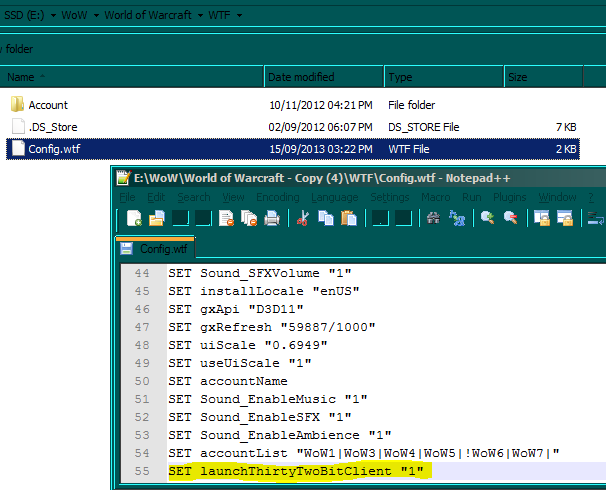
The fix to this however is quite simple first go to the 'WTF' directory under the wow directory and look for the 'Config.wtf' file, then add/amend the line below
SET launchThirtyTwoBitClient "1"


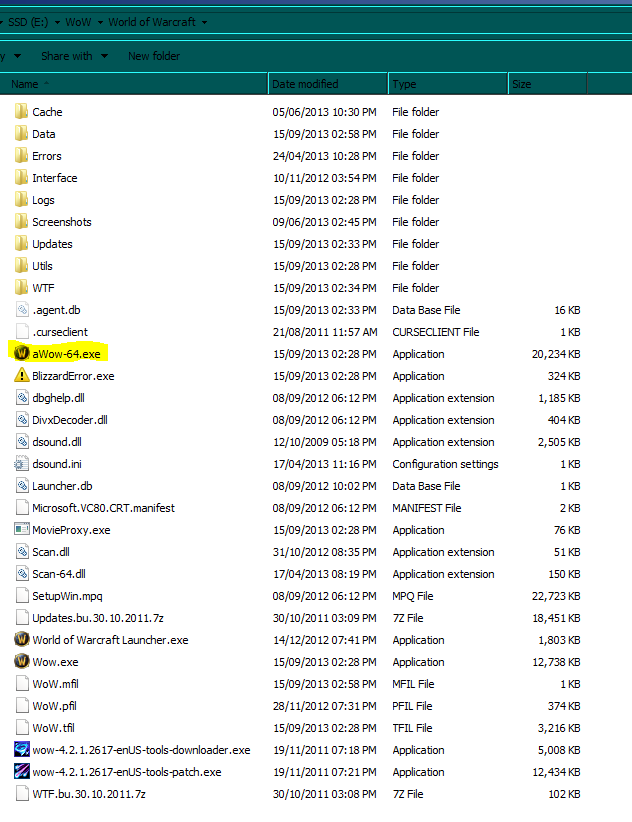
Then go to the main wow directory and rename the 64bit client from 'Wow-64.exe' to 'aWow-64.exe' that will stop the launcher trying to load it.


For more info, see the official forum post about the problem


Xsplit system sound not recording

Well this was an odd one. Today I tried to get Xsplit to record system sounds aka the sounds a game plays over the speakers etc. but it failed to do so. Mic input worked fine when tested so I had a deeper look into the issue.

It turns out that the latest patch for Xsplit did something odd to its response to being muted in the system sound panel. Rather than muting the app (xsplit) like it should, it muted the system sound input to Xsplit instead. So as a result you have to keep the app un-muted to make it work properly.


Sunday, 1 September 2013

Final Fantasy XIV: a realm reborn, pointers/advice

Recently I purchased Final Fantasy XIV and I have to say its a impressive game (just have a look at the graphics it has. see this Link)

However having played it for several hours I came to turn in a quest but it had a grayed out complete button, this had me thinking I had missed something in the quest and so I went back and followed the quest through thoroughly end to end and found .... nothing, I had not missed a thing apart from the fact that the quest turn in had ... options for a reward, but being that I have my system set at a high resolution and the text was small and a similar colour to the popup background, I missed the 'options' label entirely.

(see screen grab below so you don't miss it ;-P ,
note I have highlighted the sections so they are easy to spot )


also whatch out for things like dye or Materia vendors as these will be no good to get anything from until you have the correct crafting skills to use them unlocked (this differs from dyeing things in Rift or geming items in WoW so if you come from either of those games you will be easily caught out). 
Also on the point of differences, whilst you can buy things directly from the market boards in each main city you don't appear to be able post items directly to them (like you can in Rift or WoW) instead you have to use a 'retainer' these NPCs can be unlocked via the  'retainer representative' NPC but ..... only if you have enough rep with that city.

I hope that this post helps some of you out.